Keep your phone.
Help warn your community.
When an earthquake starts, Google warns Android phones nearby. Your neighbours, your family and the people in your building with iPhones get nothing. With Magnitude Proxy running quietly on your phone, they get that warning too. You won't notice it's there.
Invitation only for now. We are bringing volunteers in a few at a time while we make sure many phones can work together safely.
Your Android phone
Shaking expected
Magnitude Proxy passes it on
Magnitude Proxy passes it on
iPhones around you
- You won't feel it
- No screens, no sounds, almost no battery. Set it up once and forget it.
- It reaches people who would get nothing
- One phone can relay a warning across a whole area. Without volunteers, iPhones in Colombia get no earthquake warning at all.
- A few minutes to join
- Install it, turn on three switches, done. Your own alerts don't change.
3 November 2026 · 4:13 a.m.
One phone. Twenty‑one people warned.
- earthquake near Chaparral, Tolima
- M5.6earthquake near Chaparral, Tolima
- volunteer phone, 112 km away
- 1volunteer phone, 112 km away
- iPhones warned
- 21iPhones warned
- after the earthquake began, the warning went out
- 16 safter the earthquake began, the warning went out
Our only volunteer phone, in Pereira, caught Google's alert and passed it on. By our estimate the warning was on its way about 15 seconds before the strongest shaking reached the area around the phone.
One phone did that. Imagine one in every neighbourhood.
Why it matters
An earthquake warning can arrive before the shaking, with it, or after. When it comes first, a few seconds are enough to drop under a table, pull a child close, step away from a window or stop on the stairs.
Today, the people around you with iPhones never get that chance: in Colombia their phones have no earthquake warning at all. Your neighbours, your parents, the family upstairs, the people at the bus stop. With your phone in the network, they can.
You won't feel a thing. They might feel the difference.
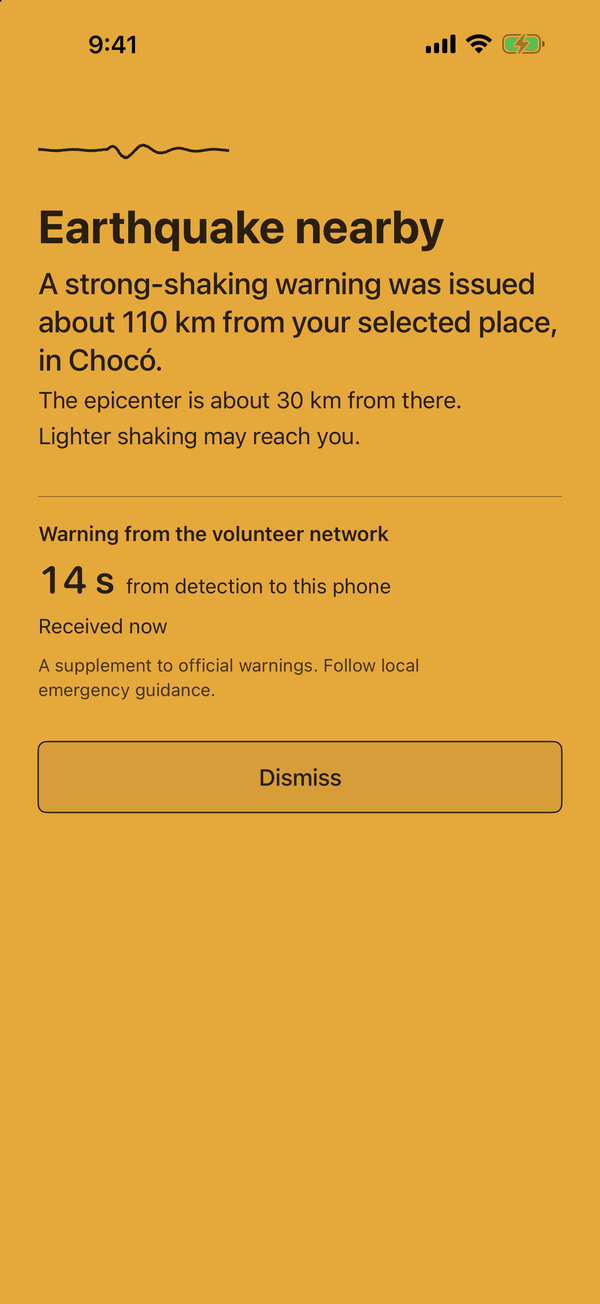
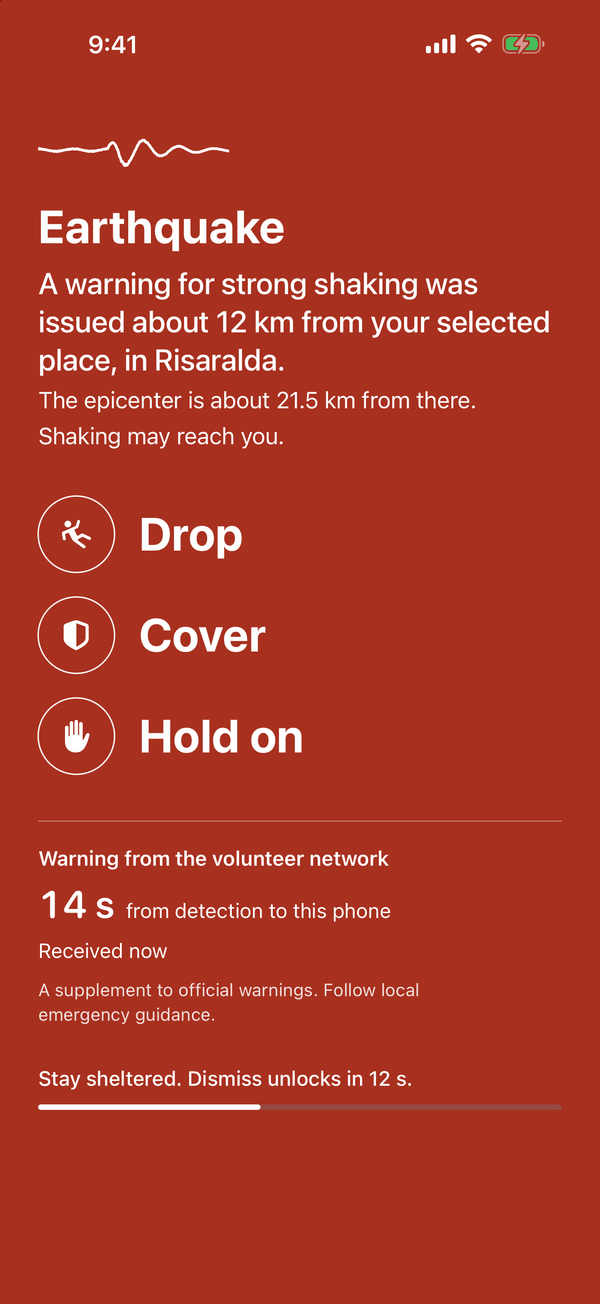
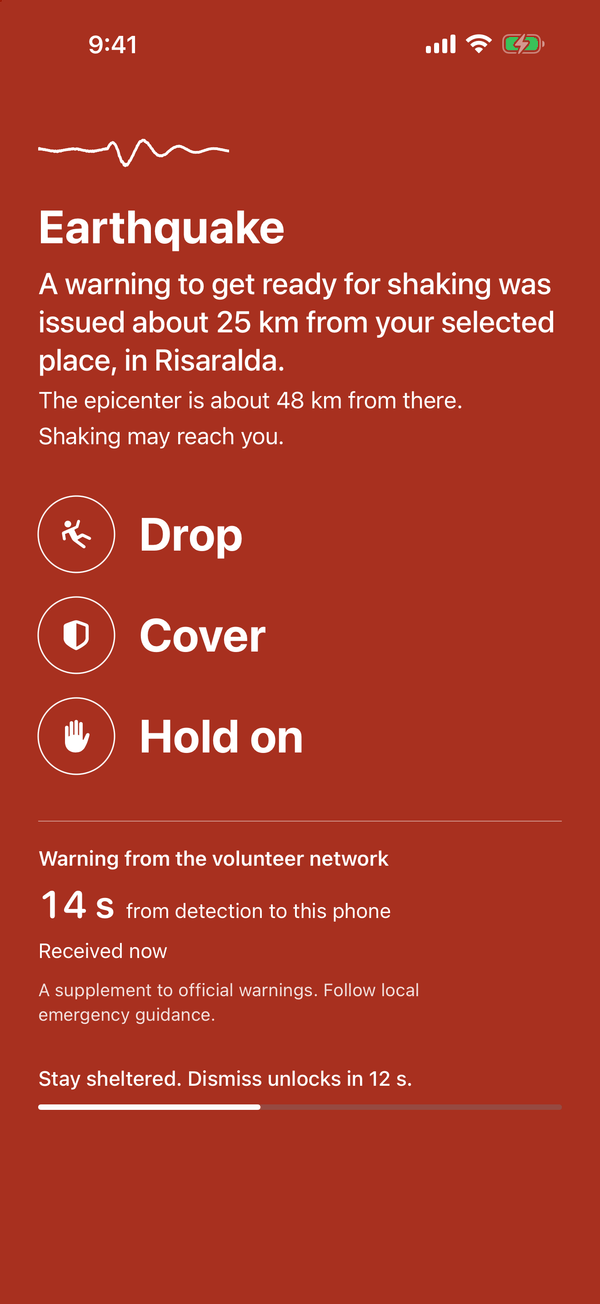
What your neighbour sees
These are Magnitude's real warning screens. Which one appears depends on the warning Google issued and how close to their place it was observed.
Act now
Get ready
Heads up
You won't feel it
No screen
Nothing to open, nothing to look at.
No sound
It never rings, buzzes or vibrates.
Almost no battery
A moment every few minutes, and more only when an earthquake alert appears.
It shows nothing and makes no sound. Every few minutes it wakes for a moment to say it is still there, which uses very little battery and data. It does more only when an earthquake alert actually appears.
How to join
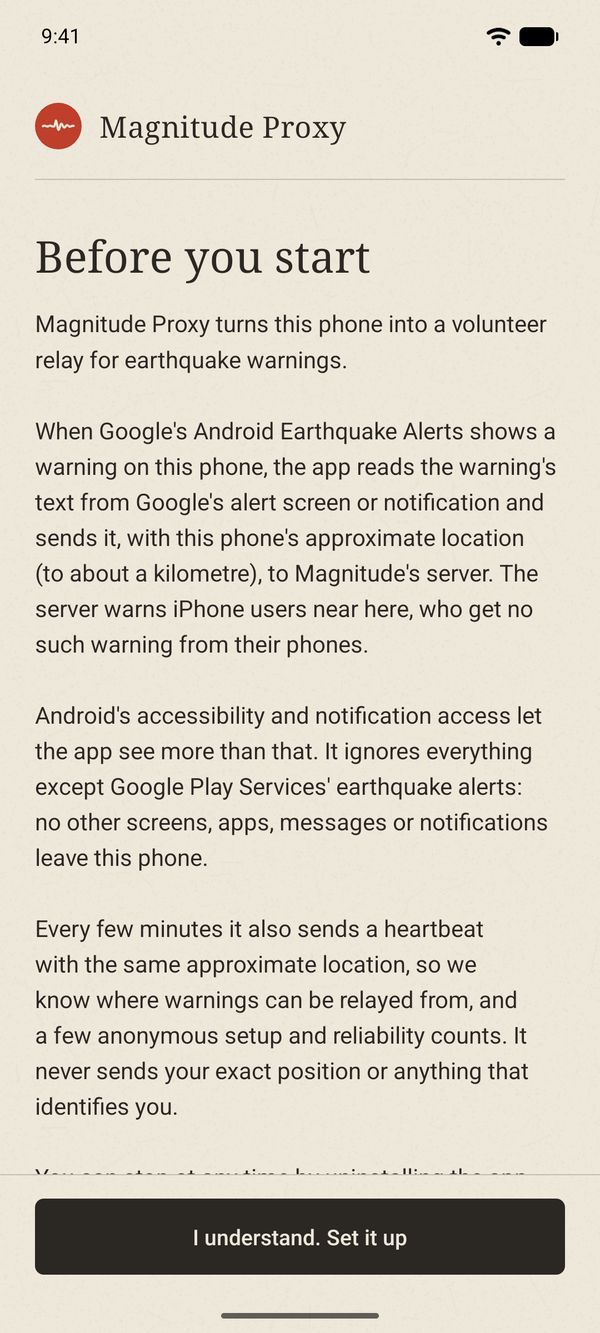
1Install
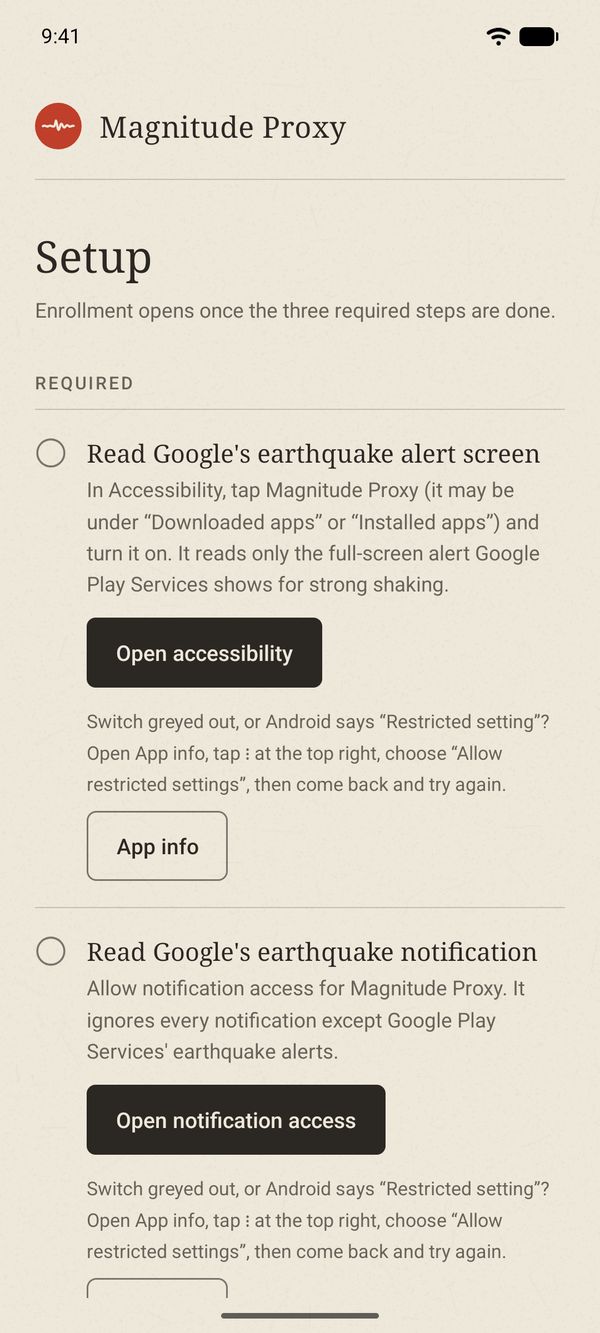
2Turn on three switches
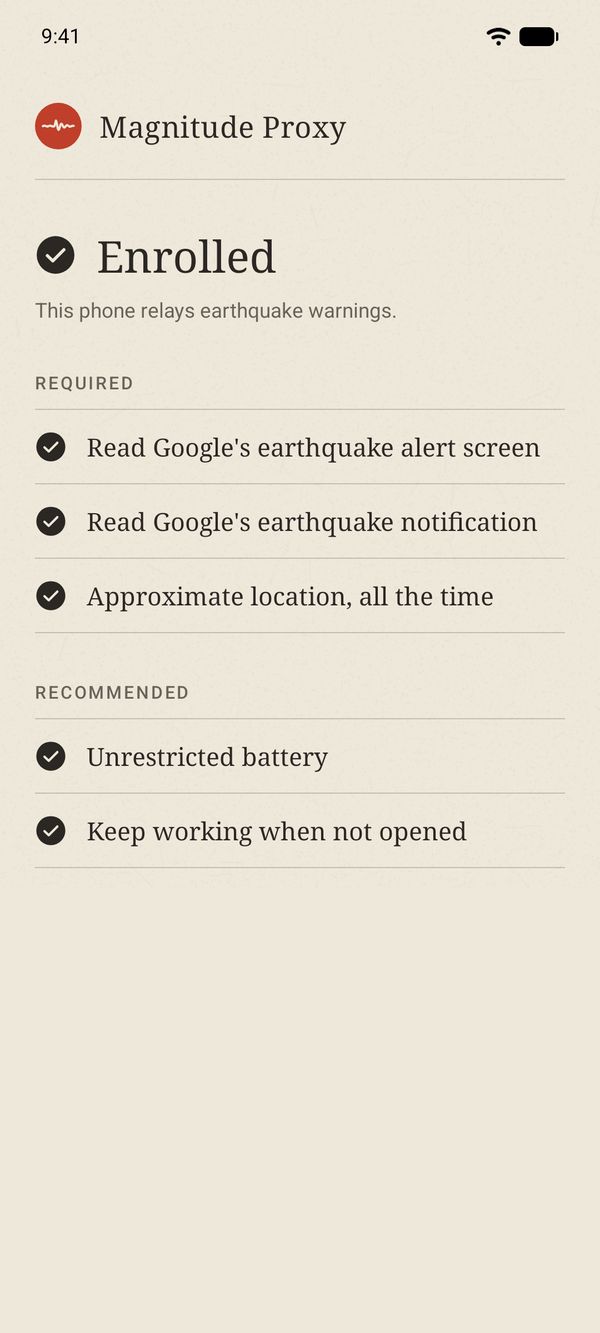
3You're in


Step by step
- 1Write to us with the town where you live and your phone's model. We reply with a download link and a one-time link that connects your phone.
- 2On the phone, open the download link and install Magnitude Proxy. Android asks whether your browser may install apps; allow it for this install.
- 3Open the app, read what it does, and tap “I understand. Set it up”.
- 4Follow the checklist: accessibility, notification access, and location set to “Allow all the time”. If Android greys out a switch or says “Restricted setting”, open App info, tap the menu at the top right, choose “Allow restricted settings”, and try again.
- 5Also allow unrestricted battery and keep the app working when it is not opened. Both are recommended; without them Android may quietly stop the app after a while.
- 6Open the link we sent. The checklist says “Enrolled” when your phone is relaying.
That's it. From then on there is nothing to do.
Where volunteers are
Today there is one volunteer phone, in Risaralda. Every new phone lights up a new area, and most of Colombia is still dark.
What you need
- An Android phone
- The one you carry is fine. Android 10 or later, with Google Play services.
- Google's alerts on
- Earthquake alerts turned on, under Settings, Safety & emergency, Earthquake alerts. They are on by default.
- Where you are
- Colombia, for now, where iPhones get no earthquake warning of their own.
- A connection
- Wi-Fi or mobile data, as your phone normally has.
- Location
- Approximate location, allowed all the time. Precise location is never requested.
Have an old Android in a drawer? Plug it in at home and it covers your neighbourhood around the clock.
What it reads and sends
It reads only Google Play Services' earthquake alerts: the full-screen alert through Android's accessibility service, and the earthquake notification through notification access. Android lets apps with those permissions see more than that. Magnitude Proxy ignores everything else, and no other screen, app, message or notification leaves your phone.
When it catches an alert, it sends the alert's text and what Android says about the notification, with your phone's location rounded to about a kilometre. Every few minutes it also sends a short heartbeat: that it is running, whether its two permissions are on, the battery level and the same approximate location, so we know where warnings can come from. It also sends a few anonymous setup and reliability counts.
It never sends your exact position, your contacts, your messages or anything that identifies you. The privacy policy lists exactly what our server keeps.
Those two permissions are powerful, because they are the only way an app can see Google's alert. That is why the app explains each one before you turn it on, and why we distribute it ourselves rather than through Google Play, which reserves that use of accessibility for accessibility tools.
How to stop
Uninstall the app. Our server marks a phone as quiet when its heartbeats stop, and we see that it has gone. If you want its records deleted too, write to us.
Questions
- Will I notice it?
- No. It has no screen you need to open, never makes a sound, and uses about as much battery as checking the time now and then. Your phone keeps working exactly as before.
- Do my own alerts change?
- No. Your phone keeps showing Google's alerts exactly as before, and it sees them first. Magnitude Proxy only passes them on to others.
- Do I need a spare phone?
- No. The phone you carry works, and helps wherever you go. An old phone left plugged in at home is a bonus: it covers your neighbourhood around the clock.
- Why do you need my location?
- A warning is true of the place where it was observed. To send it to the right people, the server has to know roughly where your phone is. It keeps only the latest position, rounded to about a kilometre, never a history.
- What happens if a phone sends something false?
- Phones join only by invitation, each with its own key that we can revoke, and tests are always marked as tests. Before we open the network more widely we are adding further checks, so that one phone cannot raise a false alarm for a whole area.
Your community could be next.
Join the volunteers who keep the people around them warned. It takes a few minutes, and you won't feel a thing.
Join as a volunteer